The New Flow-Driven Approval Engine
For years, the classic Salesforce Approval Process has been a reliable but rigid tool. While functional, it has often felt disconnected from the modern automation capabilities of Salesforce Flow. With recent platform enhancements, Salesforce now offers a powerful alternative: Flow-Driven Approval Processes.
This new approach brings approvals directly into the Flow ecosystem, enabling flexible orchestration, richer user experiences, and seamless integration with Lightning without the traditional complexity or cost barriers.
What Is Flow-Driven Approvals?
Flow-driven approvals are built entirely on the Salesforce Flow engine. Instead of relying on a separate approval framework, they use screen flows, decision logic, and background automation to manage approval journeys.
They function as an intelligent, interactive layer on top of your records. Users are guided through approvals via clear, screen-based experiences, while the system handles routing, data updates, and execution behind the scenes.
Key Capabilities
- Seamless Scalability
Supports high-volume and complex approval workflows across Salesforce editions.
- Intelligent Routing
Decision elements evaluate real-time data such as routing a deal to a VP only when margins fall below a defined threshold.
- Unified User Experience
Approvers take action directly from the record using the Work Guide, eliminating the need to search for approval of emails or links.
How the Architecture Works
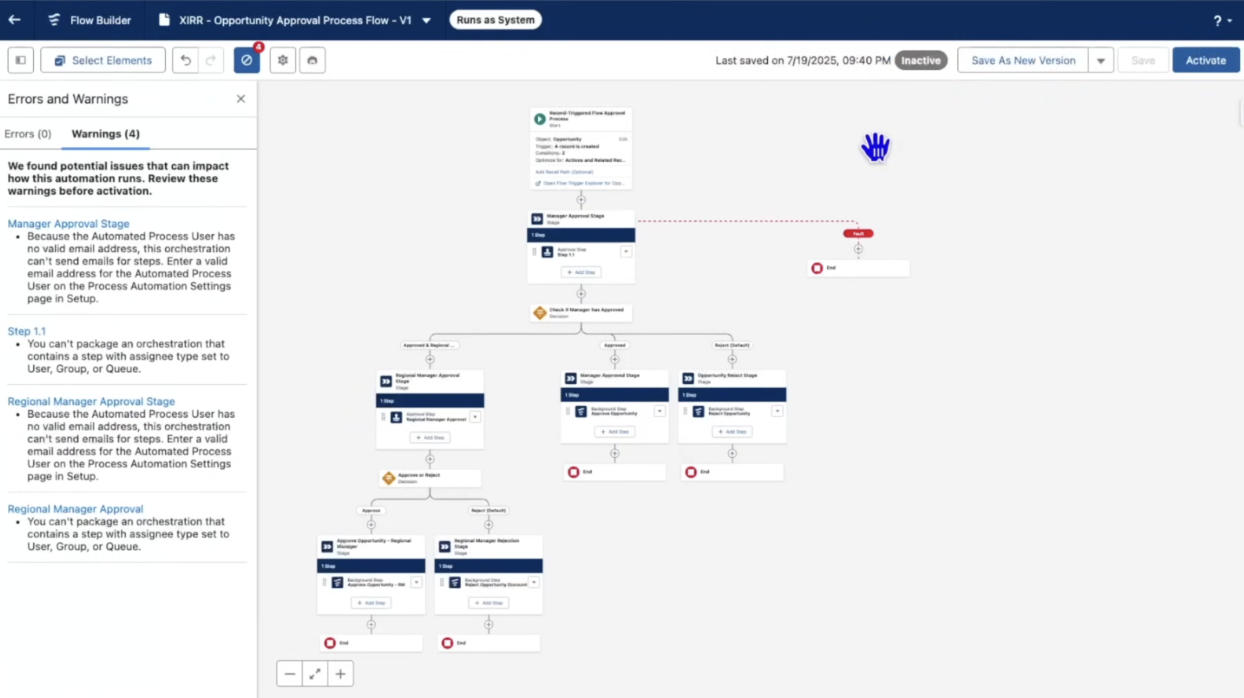
Flow-driven approvals typically follow a Stage and Step orchestration model, allowing approvals to span teams and departments with clear logic and visibility.
Illustration: Salesforce Flow canvas showing a multi-stage approval architecture with decision branches
The Intelligent Workflow
- Dynamic Entry
A record such as a high-value Opportunity triggers the process based on defined criteria (for example, Amount > $50,000 or a custom discount flag).
- Interactive Evaluation
The system assigns a task to the approver using a Screen Flow. The approver sees contextual data and can provide comments or decisions immediately.
- Conditional Logic
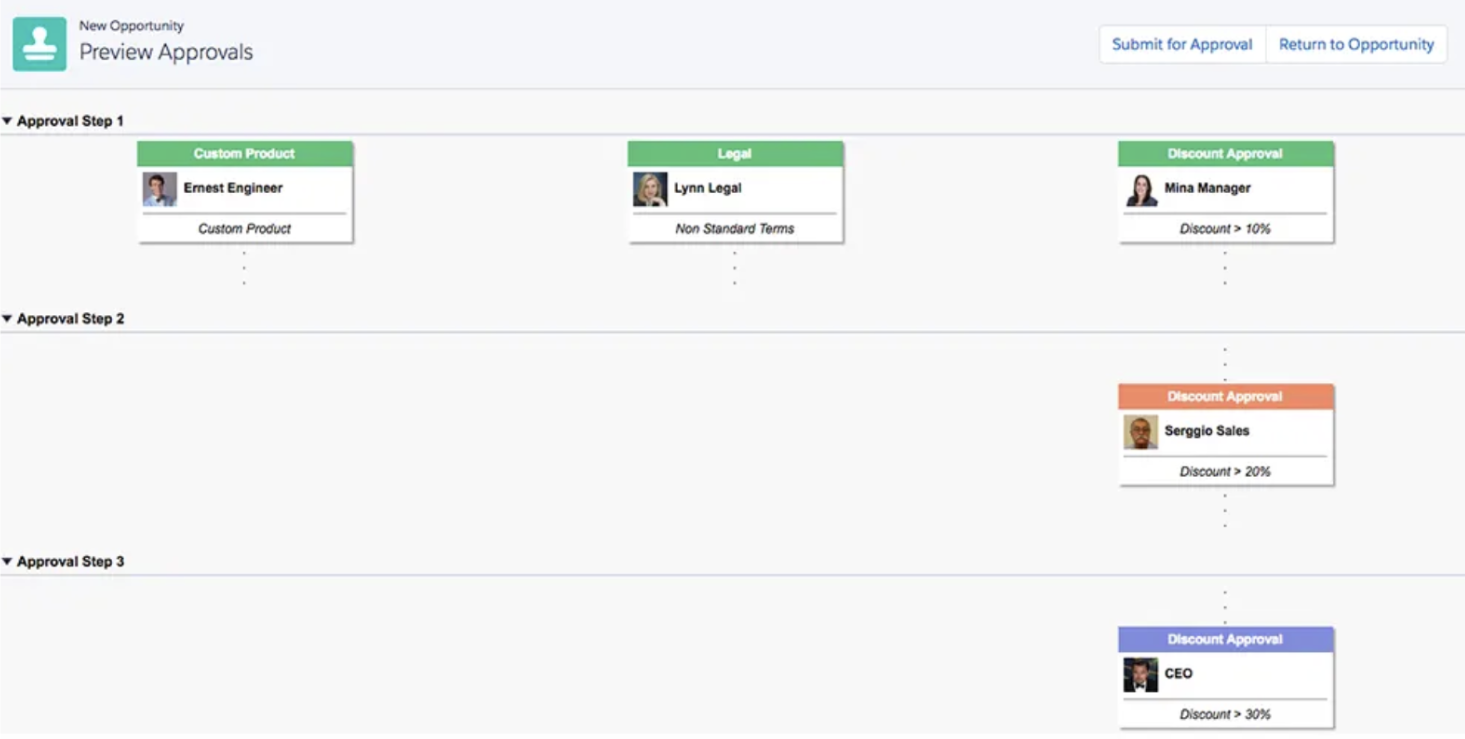
The Flow evaluates outcomes dynamically. For instance, if a manager approves a discount greater than 10%, the request is automatically routed to a Regional Director for secondary approval.
- Background Execution
After the final decision, auto-launched flows update status fields, capture timestamps, and notify stakeholders without manual intervention.
A Human-Centric Approval Experience
Salesforce approvals are no longer just status changes; they are guided, contextual experiences embedded directly into the user’s workflow.
Example Scenario
Instead of receiving a generic approval email, a manager sees a tailored experience directly on the record page:
- Current discount and deal value
- Impact on quarterly targets
- A dedicated text area for rejection or approval comments
Once the manager clicks Finish, the record updates instantly. The Approval Trace component clearly shows who approved or rejected the request, along with timestamps and comments.
Illustration: Salesforce record page showing the Work Guide and Approval Trace components
Best Practices for Transitioning to Flow-Driven Approvals
To successfully adopt this model, consider the following best practices:
- Build Modular Subflows
Create reusable background flows for actions such as Approve and Reject to reduce duplication and simplify maintenance.
- Leverage the Work Guide
Place the Flow Orchestration Work Guide prominently on Lightning record pages so approvers can act without leaving context.
- Enable Approval Tracing
Replace Classic Approval History with the Approval Trace component for improved transparency and auditability.
- Standardize Approval Fields
Use dedicated fields such as Approval_Status__c and Approval_Comments__c to ensure consistent data handling across flows.
 Final Thoughts
Flow-driven approvals represent a fundamental shift from rigid, application-centric processes to flexible, intelligent workflows. By moving approvals into the Flow ecosystem, organizations gain better control, clearer visibility, and faster decision-making, all while delivering a superior user experience.
This approach not only modernizes approvals but also aligns them with Salesforce’s broader vision of orchestration, automation, and user-centric design.